Unity – The Lost Islands
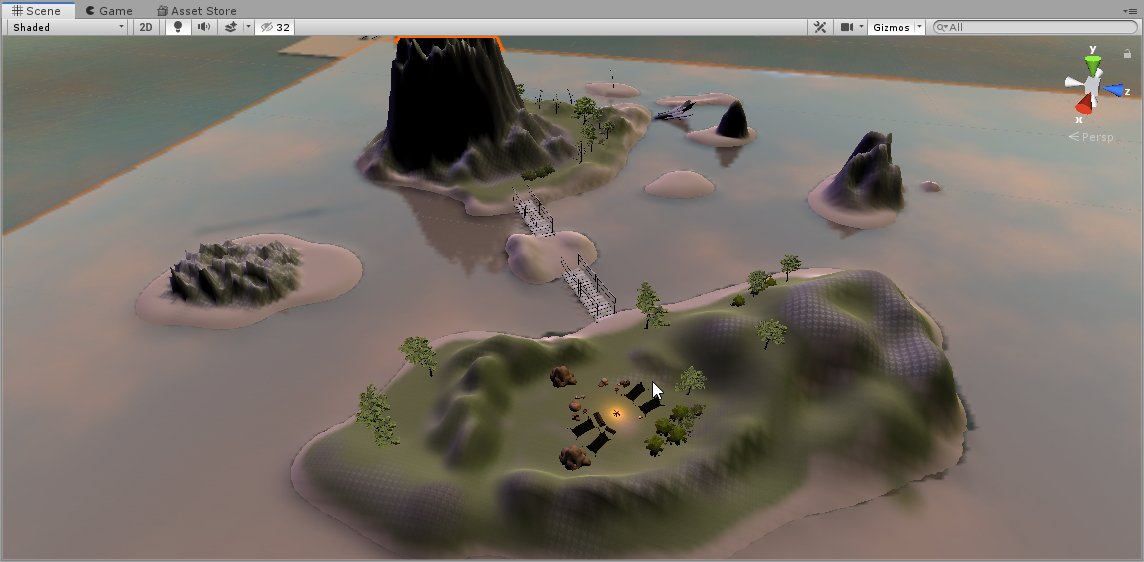


For my final output for Unity i wanted to keep working on my map from earlier, after review i noticed that the map was missing substance to it and it felt bland so decided to raise terrain to make a couple more smaller islands and to make the map feel more like a video game I found some pretty cool assets on the asset store which i built a camp with. I also felt that the islands were lacking in greenery so i added more trees and added bushes to make it feel a bit more realistic. I wanted to add a player model with a controller so that people could play the map but i fell short of time when i kept getting errors and couldn’t fix it.
Three.JS – Rainbow Static


With my three.js output I liked the work i had previously done with the knot geometry so i decided to do another knot but adjusted the geometry further to get a new shape. I started by making it into a wire frame and enabled trails. To take the cool wire-frame look further i made it so that every point will morph randomly and because the geometry shape that i chose this time has many more points making the trails a spectacle. Initially i had the mesh rotate slowly but I wanted it to look hectic and out of control but also in an aesthetically pleasing way so i made the mesh rotate a lot faster on the z axis. I also moved the camera further out away from the mesh so that we can see it scatter across the screen instead of taking up the whole space.
Processing – Event Horizon


For my processing output i combined two of my previous works together and adjusted to make the two compatible. To start I made it so that when the mouse is unpressed it will make a snake like shape using a small ellipse and it will follow where the mouse points because i changed the X and Y variables to mouseX mouseY. When the mouse is pressed in the instead of tracking the mouse there are two ellipses in the middle that change size based on the mouseX and mouseY axis but because the two ellipses follow opposite directions of the mouse they can create cool patterns and designs through random or purposeful mouse movement.
Conditional Design – Dot and Knot

Rules:
-Each player places 10 or more dots where there is the most empty space on the page (one after another)
-After placing dots you will have to connect the dots to each other creating one big knot
-You have to jump over at-least 1 line but no more than 2 before reaching the next dot
-You can’t jump over your own line
-You may take any path to the dot as-long as it follows the rules
I decided to go back to the original idea i liked the most with the knots but with slightly different rules such as instead of having to loop under and over you just jump over upto 2 lines and the placing of the dots means you have to think about your next move and how you are going to get to the dot without trapping yourself. You are considered trapped if you have no other choice but to jump your own line or jump more than 2 lines to get to your dot. An interesting thing i noticed about this design is that because you know where you have to get to people will often give the lines extra squiggles even though you may be able to just draw a straight line and this made the design look more interesting.

